
SynceriPersonal intelligenceIn development
Your life has a lot of moving pieces. Synceri keeps them in sync.
It remembers what matters, understands how it all connects, notices what's coming, and helps you handle it — before it turns into a problem.
 SynceriTuesday · 4:12 PM
Picked up today
- CalendarDentist — tomorrow, 9:30 AM
- Text from Mum“Ellie's recital is Thursday at 6.”
- Email · schoolPermission slip due Friday
Synceri
Your dentist appointment is tomorrow at 9:30. That drive is usually about 35 minutes at that hour, so leaving by 8:50 should keep you on time.
The permission slip is the only thing due before Friday. I'll remind you about Ellie's recital on Thursday morning.
Where it all lives
None of it lives in one place.
And the rest of it — the part nobody ever wrote down — lives in your head. Which is fine, right up until the week you're carrying too much of it.
The work isn't doing the things. It's holding all of them at once.
The shift
Most assistants wait to be asked.
Which means you still have to know what to ask, and remember to ask it, at the exact moment it would have helped. That's not assistance. That's another thing to keep track of.
You shouldn't have to remember to use the thing that remembers for you.
Synceri is built the other way round. It holds the moving pieces of your life, keeps track of how they fit together, and comes to you when something needs you — with enough context that you're not starting from scratch. The rest of the time, it stays out of your way.
Remember & understand
It learns the shape of your life, not just your to-do list.
Tell it something once. A name, a preference, a date, a thing you keep meaning to do. Synceri keeps it, and — this is the part that matters — keeps track of what it has to do with everything else.
- People
- Commitments
- Responsibilities
- Routines
- Places
- Details
- The people
- Who's in your life, what you owe them, what they told you last week, what they're waiting on.
- The commitments
- Appointments, deadlines, the thing you said you'd handle, the thing that happens every third Tuesday.
- The details
- Sizes, policy numbers, the code for the gate, when the warranty runs out, how long that drive actually takes.
A calendar knows you have a dentist appointment. Synceri knows it's the one you moved twice, it's across town, and you've got the school run at 3.
Anticipate
It notices what's coming.
Not one reminder, fired once, at the moment it's already too late to be useful. A commitment followed all the way through — and, eventually, a suggestion about how you'd rather be reminded.
YouMonday
I have a Zoom Thursday at 7.
SynceriThursday, 7:40 AM
Your Zoom is tonight at 7. Nothing you need to do for it yet.
Synceri6:30 PM
Your Zoom starts in 30 minutes.
Synceri6:55 PM
Five minutes. Ready to join?
SynceriA few weeks later
Evening meetings seem easier to miss than the rest of your week. Want me to start reminding you an hour ahead on those?
It asks. It doesn't decide. Nothing changes about how Synceri reaches you unless you say yes.
What matters now
Some days, the honest answer is four things.
Calendars understand time. Task managers understand tasks. Neither of them understands the thing you actually needed help with, which is how much you can carry today.
A list
19 overdue
All equally urgent, which is the same as none of them being urgent.
- Reschedule dentist
- Order dog food
- Permission slip
- Call insurance about the claim
- Pediatrician — 2:15
- Electric bill
- Reply to Dana
- Book oil change
- Return the blue jacket
- Water filter
- Renew library books
- Find the warranty for the dryer
- RSVP — Saturday
- Grocery pickup, 5:30
- Sign up for swim lessons
- Update the emergency contact form
- Cancel the trial
- Photos off the phone
- Ask Jamie about the carpool
Synceri
Four things actually need you today.
- Pediatrician, 2:15Can't move, and it's today.
- Electric billDue today. Two minutes.
- Permission slipDue tomorrow, and it needs a signature.
- Reply to DanaShe's waiting on you to book the room.
The other fifteen can wait. They're not gone — Synceri brings them back when they actually matter.
Synceri isn't trying to make you more productive. It's trying to make the day survivable.
Being built
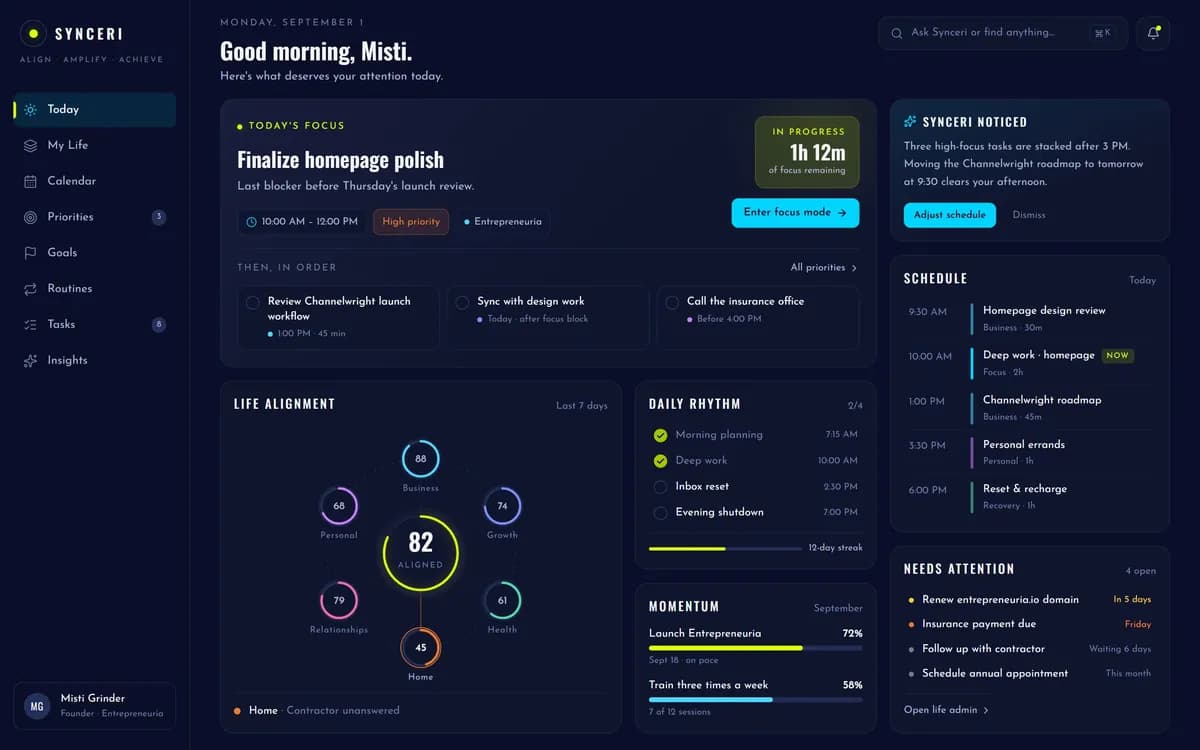
What it looks like so far.
One day, in one place: what deserves your attention, what Synceri noticed on its own, and what's still waiting.
Act
Telling you is the easy part.
A reminder moves a task from the app back onto you. The useful version keeps going — and where Synceri can finish something, it should, with your say-so.
- 01
It tells you
The reminder you'd have wanted, at the hour it's useful, with the context that makes it actionable.
Core to the first release
- 02
It gets you ready
The document pulled up before the call. The address, the route, the account number, the thing you said last time. Ready when you get there.
Core to the first release
- 03
It handles it
Booking the appointment, sending the follow-up, filling the form, putting the order in — each one on your say-so, and only where you've connected it.
Planned, as integrations open up
Everywhere
It meets you where the day is happening.
Opening an app is a thing you have to remember to do. Synceri is meant to reach you on whichever surface you're actually near — and to be quiet on the rest.
Phone
7:10 AM
Three things today. The first isn't until 11.
Watch
1:52 PM
Pediatrician in 25. Leave in 10.
Web
3:20 PM
Here's the insurance letter you asked about, and what it says.
Voice
6:10 PM
Driving home. “Remind me to sign the permission slip tonight.”
Planned
Shared life
Some of it was never only yours.
Someone says “we need nappies.” Somebody buys them. Nobody texts three people to find out whether it's handled. That's a Circle — a small amount of shared context, and nothing else.
- You
- Sam
- Mum
- The shopping list
- Everyone in the household
- Appointments you mark shared
- Your partner
- School dates and pickups
- Your partner, your mum
- Who's covering what this week
- Everyone in the household
- Everything else
- Nobody
Shared is a decision you make, row by row.
A Circle shares the specific things you put in it. It is not a window into your life, it doesn't report where you are or what you've been doing, and it doesn't give anyone a say over your day. Everyone in a Circle keeps their own Synceri, and their own privacy, entirely intact.
Coordination should cost less than a group chat. It should never cost independence.
Planned — after the first release
Also
And everything you'd expect an AI to do.
Synceri does the things you already know how to use an AI for. They're just not the reason it exists.
- Ask it anything, the way you'd ask anyone
- Draft the message you're avoiding
- Read the letter and tell you what it actually says
- Look something up and come back with a straight answer
- Make sense of a photo, a PDF, a screenshot of a schedule
Every assistant can hold a conversation. The difference is whether it knows anything about you when the conversation starts.
Memory and control
Four questions you should be able to ask it.
Synceri only works if it knows things about you. That makes inspection, explanation and deletion part of the product — not a policy page you never read.
- “What do you know about me?”
- A list you can read, sorted by where it came from and when. Your context is not a black box — if Synceri knows it, you can see it.
- “Why did you remind me about this?”
- The reason, in plain language: what Synceri connected, and what made it think this mattered now. An assistant that can't explain itself is asking for trust it hasn't earned.
- “Forget this.”
- It goes, along with anything Synceri worked out from it. Not archived, not hidden from the list — removed.
- “Don't use this source.”
- Every connection Synceri draws on is one you granted and can revoke. Turn one off and it stops being part of the picture.
These are the principles Synceri is being built to: what it knows is inspectable, what it does is explainable, what you remove is gone, and what it can reach is yours to grant and yours to take back.
If you also run a business
Then it has more to work with.
Synceri is part of Entrepreneuria, so for anyone building something, it can sit between the life and the business — the follow-up from this morning's conversation, the proposal that's due, the school pickup at 3, all understood as one person's day rather than two separate systems with two separate notification badges.
That's an advantage if you want it. It is not a requirement, and nothing about Synceri assumes you run anything at all.
Works with
Prospra, Architecta, Directorium and Channelwright — as each one ships.
Synceri works on its own from day one. The ecosystem is the ceiling, not the entry price.
Soon
Life has enough to remember.
Synceri is being built so the important things stop depending on whether you happened to think of them. It's in development now — join the waitlist and you'll be among the first people using it.
Synceri is in development. Capabilities on this page marked “planned” are the direction it's being built in, not what ships first.